Register
To start learning with Simzy, you’ll need to create an account.
You can register using your email & password, Google account, or Apple ID.
Register with Email & Password
- Open the Simzy app.
- On the welcome screen, tap Sign Up with Email.
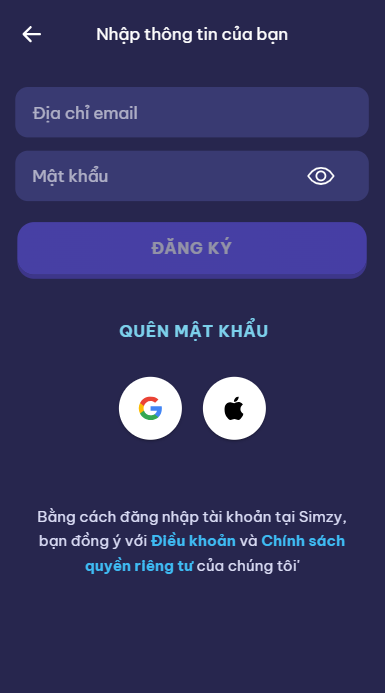
- Enter your full name.
- Enter your email address.
- Create a strong password.
- Tap Register to create your account.
- Verify your email (check your inbox for a confirmation link).
✅ Once verified, you can log in with your email and password anytime.
Register with Google
- Open the Simzy app.
- Tap Continue with Google.
- Select your Google account or sign in with your Google credentials.
- Grant Simzy permission to access your account for authentication.
- Your Simzy account will be created and linked to your Google ID.
✅ Fast and secure — no need to remember another password.
Register with Apple
(iOS only)
- Open the Simzy app on your iPhone or iPad.
- Tap Continue with Apple.
- Confirm with Face ID, Touch ID, or your Apple ID password.
- Choose whether to share or hide your email address.
- Your Simzy account will be created and linked to your Apple ID.
🔒 Apple Sign-In provides extra privacy and control over your personal information.
Tips
- Use the same method (Email, Google, or Apple) to log in across devices so your progress syncs properly.
- If you signed up with Google/Apple, you must continue logging in with that method.
- For schools or enterprises, your teacher/admin may provide a special registration method — follow their instructions.
✅ You’re now registered! Log in and start your learning journey with Simzy 🚀.